Designing with, for and alongside AI
This is part case study, part blog post.
Design has changed so much in the last 18 months, and it feels like things are just getting started. There are dozens of new posts every day around what this means. I am not trying to write another one of those. Instead, this is my perspective on designing with, for, and alongside AI grounded in real work. A mix of thinking, building, and what’s changed along the way.

What has actually changed?
I am currently the solo designer at a fast paced, AI-native start up, leading both strategy and execution of our design vision across our existing and future products. As much as I’d love to be able to create every screen and interaction, the balance of resourcing means many of the UI ‘designs’ at this point comes not from me but from my Product Managers or other colleagues in various domains, using my design guidelines and their well intended vibes.
So what has changed for me? The short version: less time in Figma, more time in code and docs. More “straight to visuals,” more “everyone’s a designer,” and yes, more heartburn and pivoting.
Tactically, I still lean on traditional design habits (read: fidgeting in Figma), but the toolkit has expanded. Early on, I’ll outline a discovery session or workshop and run the plan and the outputs through LLMs (ChatGPT, Claude, Perplexity) to pressure test assumptions and poke holes. I use Claude CoWork to manage context and priorities, and tools like Granola and Notion AI to capture meetings, user interviews, and surface patterns quickly.
Once the problem is clear, I move into Figma for wireframes and stakeholder alignment across product, engineering, and GTM. After the flows feel solid, I shift to prompt-based coding tools (lately Claude Code and Cursor are my go-tos )to prototype. Sometimes I’m driving, sometimes a PM or SME is prompting and we review together.
From there, it’s a tight loop: discussions and reviews, design, prototype, repeat. As things solidify, I partner closely with engineering to refine interactions, edge cases, and implementation details. I also use this phase to evolve the system itself and maintain good code and design hygiene by updating components, code rules, and theme files so the work scales. Occasionally, I’ll even ship vibed code to main (after a thorough review from a real engineer, of course). My GitHub activity probably looks suspicious for a designer at this point.
The overall process hasn’t changed: start with the problem, think, plan, iterate, create, document. It’s just a blurrier landscape across my product colleagues, more iterative, and puts a heavier emphasis on judgment and thoughtfulness.
Case Study 1: AI Chat Experience
Led the UX strategy, design and build of our AI chat experience—from a static, pre-prompted chatbot to a fully integrated LLM-powered assistant embedded in trader workflows.
Process
Technical Challenge
Early implementations across the team felt generic and disconnected from the product experience. I wanted to make sure I could create designs that fit naturally into our product and component ecosystem, fulfilled the right documentation and set up (so any engineer could come in and evolve on it easily) and was modular and built for AI agents to easily understand (so any PM could come in and vibe on it confidently.)
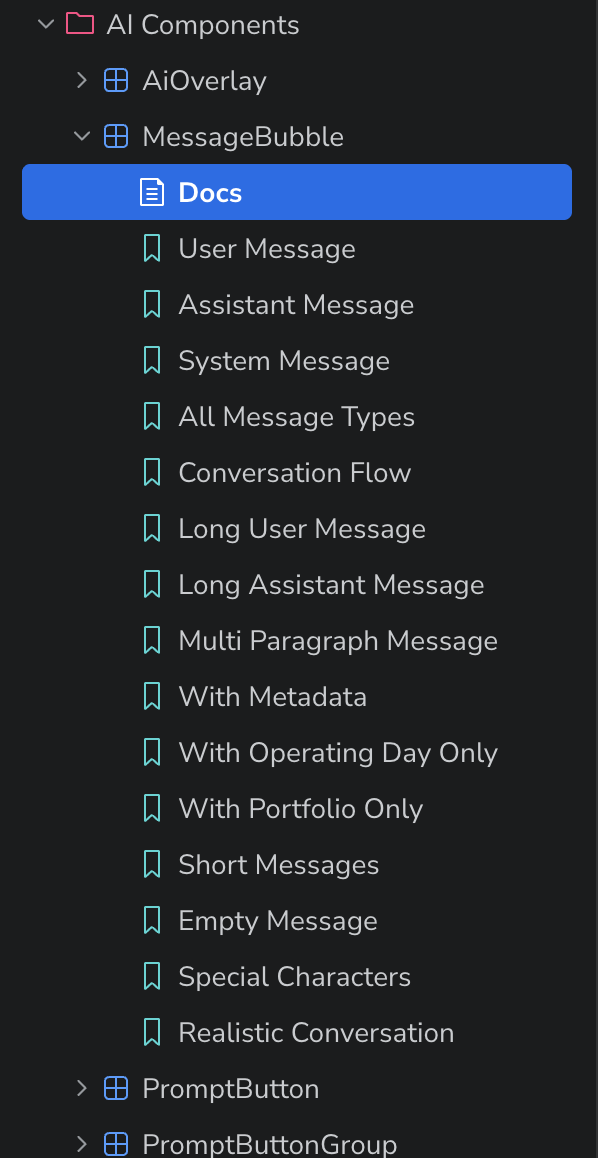
Conducted targeted user research to understand trust gaps and AI-specific workflow needs
Design research to map familiar interaction patterns to anchor the experience in known mental models
Designed core interaction patterns and components in Figma
Translated reusable elements into prompt-coded Storybook components using Cursor
Prototyped end-to-end flows and interaction behaviors using the new AI component in Cursor
Authored prompt-driven documentation to enable scalable contributions from engineering and product
v1 Static prompted question experience
Design Challenge
Based on user interviews and research, we found that energy traders don’t trust AI in their workflows (yet). Existing tools lacked access to domain-specific data, and hallucinations introduced unacceptable risk. Rather than position AI as a replacement, we reframed it as a supporting analyst that can help traders interrogate data, validate instincts, and move faster without sacrificing control.
Outcomes
AI components broken into stories to cover all use cases - all created and documented by me (with eng. reviews)
Validated improved trust and usability through interviews with internal traders
Time from concept → working prototype → Engineers iterating and connecting data → working feature that internal users were testing in ~1week
Established a reusable, extensible foundation for future AI-driven features
In our ‘start simple’ we intentionally constrained the experience to pre-populated questions with tightly scoped responses. This allowed us to validate response quality and introduce AI into trader workflows without overexposing risk. I anchored interactions in familiar chatbot patterns to minimize the learning curve and make the experience immediately usable. The goal wasn’t to provide users with the most robust AI enabled experiences off the bat but building a sense of confidence and trust.
v2 Transparent Agent experience
In the next iteration, we expanded the experience into an open-ended, agent-driven system with traceable reasoning. Users can ask freeform questions, select agents, and receive structured, actionable responses.
Crucially, we introduced transparency into the system: responses show the exact steps taken, datasets referenced, and underlying reasoning. Users can directly access the data used, enabling them to validate outputs against their own judgment, which addressed a key painpoint uncovered in why traders don’t use AI tools in their workflows today.
This shift from constrained outputs to transparent reasoning was key to increasing trust. Rather than asking traders to believe the AI, we gave them the tools to interrogate it.
(And when the system doesn’t have a confident answer, it says so, providing partial support without pretending to know everything.)
Learnings
Learner + User + Creator
There’s a special designer privilege in operating as all three at once. As I learn and use these tools myself, I actively translate those insights into what we build. It creates a tighter feedback loop and a more grounded form of empathy than research alone.
Designing for a moving target
The landscape is evolving fast, both in tool capability and user familiarity. Many of our users are experimenting with AI personally, but not yet in their workflows.
The challenge is how do we design for where they are now while also building systems that can evolve with them? This requires constant recalibration and staying on our toes by listening, learning, and adjusting in near real-time.
With great power…
As the ecosystem matures, the patterns we introduce don’t just shape our product but can also shape how users understand and trust AI more broadly.
And regardless of our personal perspectives, that means we need to be mindful that designing AI means designing for trust and requires a higher sense of responsibility.
Note: The content in this post was reviewed using AI tools. All text was written and edited by a human (🙋🏻♀️), run through an LLM for grammatical clarity and conciseness, then went through a final human review.

Just a reminder to always stay grounded, trust your instincts and touch grass. Never forget to touch grass.